Open a PPF Account Online in India: 2026 Step-by-Step Guide
Shlok Sobti
Open a PPF Account Online in India: 2026 Step-by-Step Guide
You want to open a PPF account, but the moment you search online, you hit a wall of confusing bank portals, post office procedures, and conflicting advice. Some sites say you need to visit a branch. Others claim everything is digital. You end up with more questions than answers.
Here's the truth: opening a PPF account online in 2026 is straightforward. Most major banks let you do it through internet banking in under 10 minutes. The post office route takes a bit more paperwork, but you can still start the process from home. Once you know which path fits your situation, the rest follows a clear pattern.
This guide walks you through each step. You'll learn what a PPF account actually does, who can open one, and what documents you need before starting. Then we'll cover the exact process for both bank and post office accounts. You'll also see how to fund your account, add nominees, track your balance, and maximize returns. By the end, you'll have a complete roadmap to get your PPF account up and running.
What a PPF account is and how it works
A Public Provident Fund (PPF) account is a government-backed savings scheme designed to help you build wealth over the long term. The National Savings Institute launched it in 1968, and the Ministry of Finance sets the interest rate every quarter. Your money grows at a fixed rate compounded annually, and both your deposits and returns qualify for tax benefits under Section 80C of the Income Tax Act.

The account operates on a 15-year tenure with specific deposit windows and withdrawal conditions. You can open a ppf account online through authorized banks or the post office, and the same rules apply regardless of where you hold it. The scheme offers complete safety because the Government of India backs every rupee you deposit.
The basic mechanics of PPF deposits and returns
You need to deposit a minimum of ₹500 per financial year to keep your account active. The maximum cap sits at ₹1.5 lakh annually, and you can make deposits in a lump sum or up to 12 installments throughout the year. The interest rate for Q4 FY 2025-26 stands at 7.1% per annum, compounded yearly on the balance at the end of each financial year.
Your interest calculation depends on the lowest balance between the 5th and the last day of each month. This means deposits made before the 5th of any month earn interest for that full month, while deposits after the 5th only earn from the next month. The interest credits to your account on March 31st every year.
Timing your deposits before the 5th of each month maximizes your interest earnings throughout the year.
Lock-in period and withdrawal rules
The account locks your funds for 15 years from the end of the financial year in which you opened it. You cannot withdraw the full balance before this period ends, except in specific cases like medical emergencies or higher education expenses. The government allows partial withdrawals starting from the 7th financial year, limited to 50% of the balance at the end of the 4th year or the preceding year, whichever is lower.
You can also take a loan against your PPF balance from the 3rd to the 6th financial year. The loan amount cannot exceed 25% of the balance at the end of the 2nd year. After maturity, you can extend the account in blocks of 5 years indefinitely, with or without making further deposits. The account continues earning interest during extensions.
Eligibility rules to open a PPF online
The PPF scheme sets clear boundaries on who can open an account and how many accounts you can hold. These rules apply whether you open a ppf account online or visit a branch physically. Understanding your eligibility saves you from starting an application that gets rejected halfway through. The government designed these restrictions to prevent misuse and keep the scheme focused on individual long-term savings.
Who qualifies to open a PPF account
You can open a PPF account if you hold Indian resident status. This means you must be living in India and have a valid Indian address at the time of opening. The scheme restricts each person to one account only across the entire country. You cannot hold separate accounts in multiple banks or split one at a bank and another at the post office.
Adults aged 18 and above can open accounts in their own name without restrictions. You need to provide identity proof, address proof, and PAN details during the application process. The account operates solely in your name, and joint accounts are not permitted under PPF rules.
Restrictions on NRIs and HUFs
Non-Resident Indians (NRIs) cannot open new PPF accounts. If you opened an account while you were a resident and later became an NRI, you can continue the account until the 15-year maturity period ends. However, you lose the option to extend the account after maturity. The account must be closed and the balance withdrawn.
Hindu Undivided Families (HUFs) also face restrictions. The government stopped allowing HUFs to open new PPF accounts after May 13, 2005. Any HUF accounts opened before this date can continue until maturity but cannot be extended further.
If your residential status changes to NRI after opening a PPF account, you must inform your bank or post office immediately.
Opening accounts for minors
Parents or legal guardians can open PPF accounts on behalf of minors under age 18. You control the account as the guardian until the child turns 18, at which point the account converts to their name. Only one parent can open a single PPF account for each child. Both parents cannot open separate accounts for the same minor.
The combined deposit across your own account and your child's account cannot exceed ₹1.5 lakh per year if you fund both. This ceiling applies per individual, not per account.
Documents and accounts you need ready
You need to gather specific documents before you start the online application process. The requirements stay consistent across banks and post offices, though some institutions may ask for additional verification depending on your existing relationship with them. Having everything ready prevents delays and rejected applications.
Identity and address documents
Your bank or post office verifies your identity through government-issued documents. The most commonly accepted proofs include your Aadhaar card, PAN card, passport, voter ID, or driving license. Most banks now prefer Aadhaar because it enables instant eKYC verification through OTP, which speeds up account opening significantly.
For address proof, you can submit any of these documents:
Aadhaar card (serves dual purpose)
Recent utility bills (electricity, water, gas)
Passport
Voter ID card
Driving license
Bank account statement (not older than 3 months)
You also need two recent passport-size photographs if you choose the offline route through post offices. The online bank method usually pulls your photo from existing records.
Banking prerequisites
Before you open a ppf account online, you must hold an active savings account with the bank you select. Your internet banking or mobile banking access needs to be fully functional because the entire application flows through these digital channels. The bank links your PPF account to your savings account for automatic deposits and withdrawals.
Having your PAN card linked to your savings account eliminates extra verification steps during PPF account creation.
Your savings account should have the minimum balance required to make your first PPF deposit, which starts at ₹500.
Step 1. Decide where to open your PPF account
You face a straightforward choice when you open a ppf account online: authorized banks or the post office. Both options follow identical interest rates set by the government and offer the same tax benefits. The difference lies in convenience, digital access, and existing banking relationships. Your choice depends on where you already hold accounts and how you prefer to manage your deposits.
Understanding your two main options
Banks provide the fastest purely digital route if you already hold a savings account with them. You complete the entire process through internet banking or mobile apps without visiting any branch. Major authorized banks include SBI, HDFC Bank, ICICI Bank, Axis Bank, PNB, Bank of Baroda, Canara Bank, and several others. The process takes 5 to 10 minutes once you log into your banking portal.
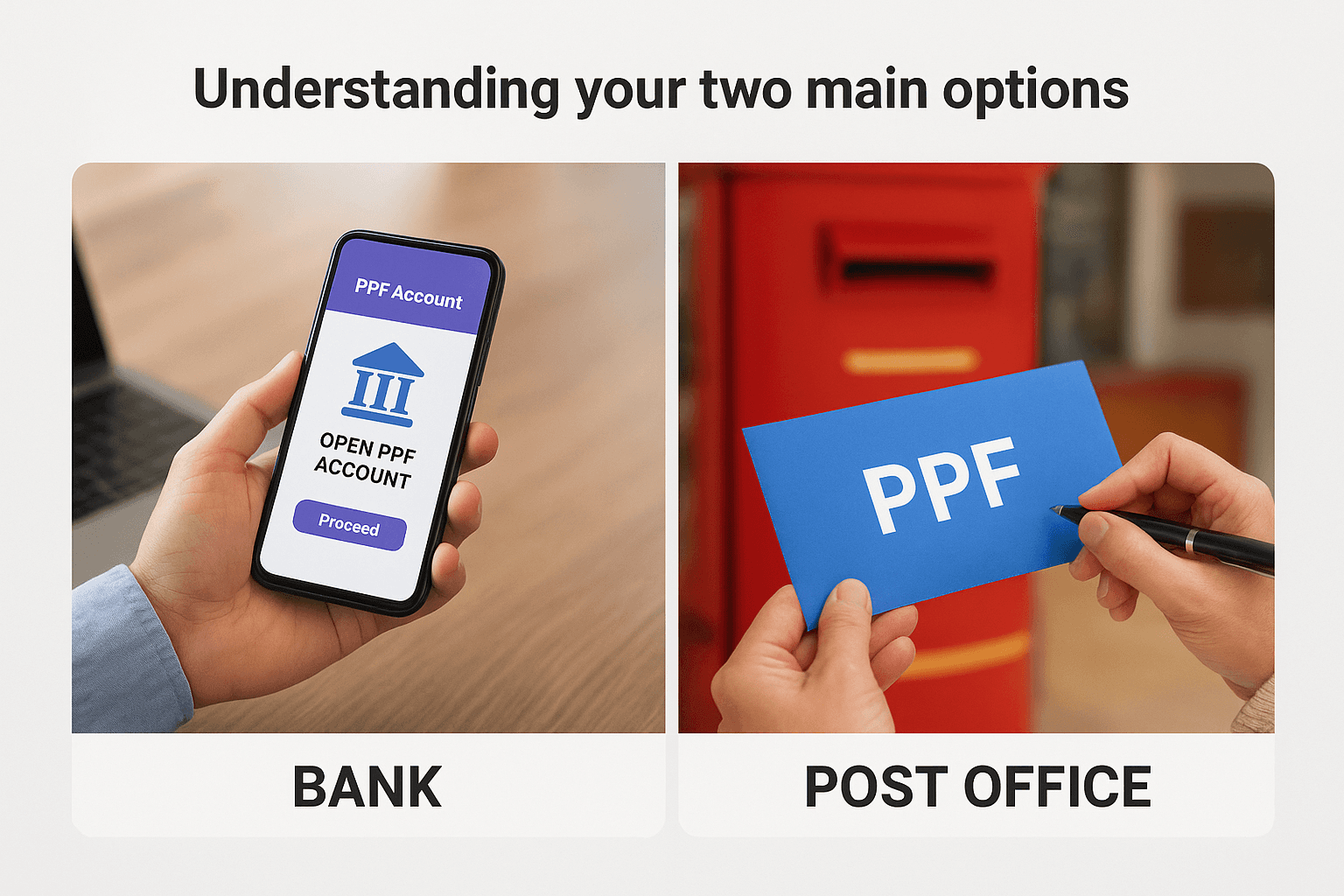
The post office path requires more paperwork but works well if you don't have an account with an authorized bank. You download forms from the India Post website, fill them out, and submit them at your nearest post office along with physical documents. Some post offices now accept online applications through their portal, but you still need to complete KYC verification in person. This route takes a few days to a week for account activation.
Banks win on speed and convenience, while post offices offer wider accessibility in smaller towns where authorized bank branches may not operate.
Which option fits your situation
Choose a bank if you meet these conditions: you already maintain a savings account with an authorized bank, your internet banking works properly, and you want instant account creation. The bank route also makes ongoing deposits easier because you can set up automatic transfers from your linked savings account.
Pick the post office if you face these situations: you don't have an account with any authorized bank, you live in an area with limited bank branches, or you prefer handling financial matters through India Post. The post office network reaches more locations across India compared to individual banks, which helps if you move frequently or live in tier-2 or tier-3 cities.
Your existing relationship matters most. If you already use SBI for salary deposits, opening your PPF there keeps everything in one place. If you trust your local post office and visit it regularly, that familiarity reduces friction when managing your account over the next 15 years.
Step 2. Open a PPF account through your bank app
The bank app route delivers the fastest way to open a ppf account online without visiting any branch. You complete the entire process through your mobile banking app or internet banking portal in one sitting. Most banks follow a similar pattern, though the exact menu names and screen layouts vary. The process takes between 5 and 15 minutes depending on how quickly you fill the forms and whether your KYC details are already on file.
Logging in and locating the PPF account option
Start by opening your bank's mobile app or logging into internet banking on your computer. You need your customer ID and password ready, along with access to your registered mobile number for OTP verification. Once you're logged in, the PPF option usually sits under investment services or deposit accounts.
For SBI users, navigate to the side menu and look for "New PPF Account" under the deposits or government schemes section. The HDFC Bank portal places it under "Investments" and then "PPF Account." ICICI Bank users find it under "Investments and Insurance" followed by "Public Provident Fund." Axis Bank lists it under "Investment" in the main menu.
Each bank uses slightly different terminology, but you're looking for phrases like:
Open PPF Account
New PPF Account
Public Provident Fund
Government Schemes → PPF
The option appears clearly labeled once you reach the investments or deposits section.
Filling out the application form
After you click the PPF account option, the system displays an application form with mandatory fields. You need to specify whether you're opening the account for yourself or as a guardian for a minor. Select "Self Account" if you're opening it in your own name.
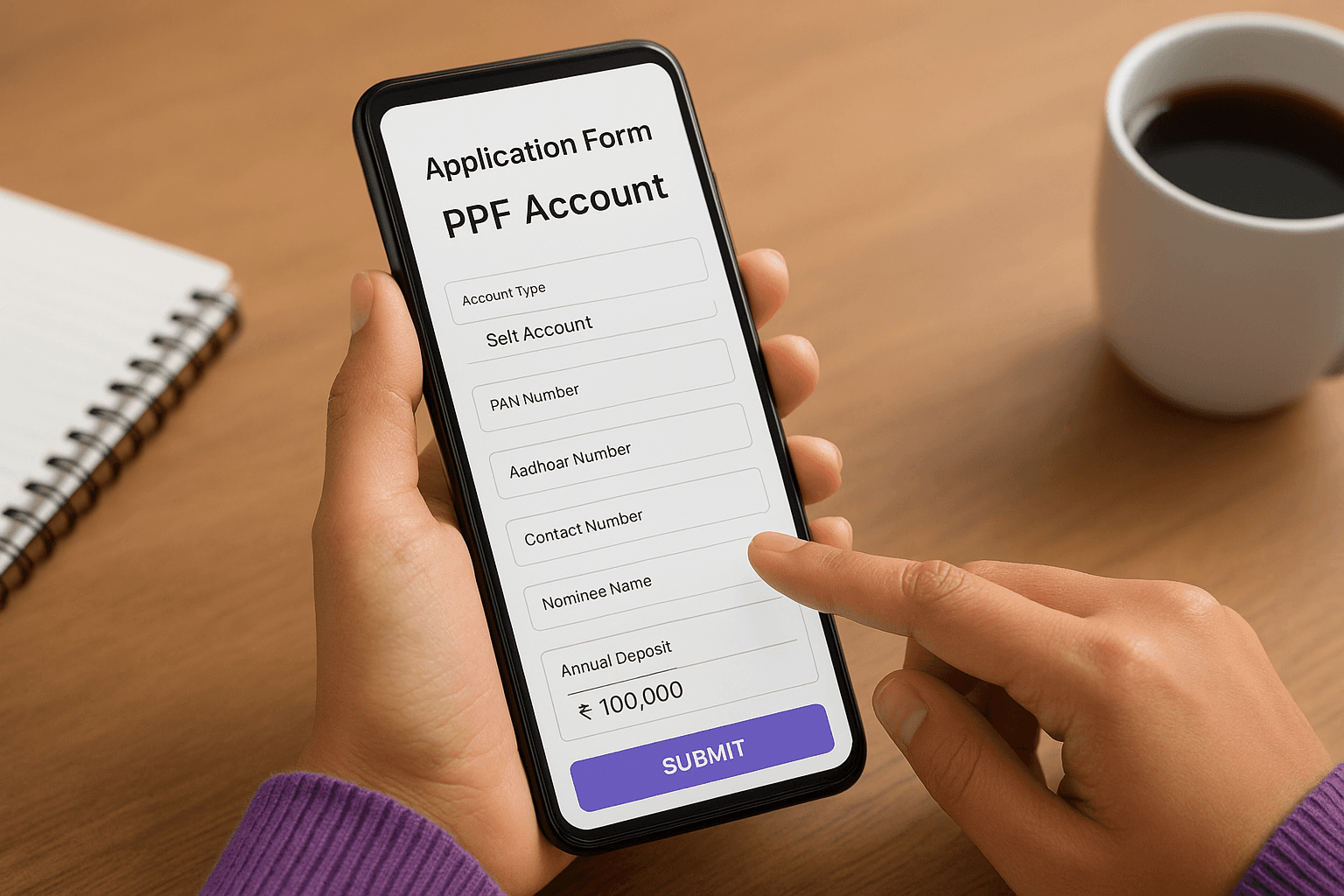
The form asks for your PAN number, Aadhaar number, contact details, and nominee information. Most banks auto-fill details they already hold from your savings account profile. You verify these details rather than typing everything fresh. The system performs instant eKYC verification using your Aadhaar OTP if your Aadhaar is linked to your mobile number.
Enter your annual deposit commitment, which must fall between ₹500 and ₹1.5 lakh. You can change this amount later, but setting it now helps you plan automatic transfers. Choose whether you want to deposit monthly, quarterly, or annually based on your cash flow preference.
Setting up monthly auto-debit of ₹12,500 ensures you maximize the ₹1.5 lakh annual limit without missing deadlines.
Completing the first deposit and account activation
The final step requires you to authorize your first deposit to activate the account. The minimum amount is ₹500, though you can deposit more if you want to start strong. The system debits this amount from your linked savings account through an internal transfer.
You receive an OTP on your registered mobile number to confirm the transaction. Enter this OTP to complete the process. Within seconds, the bank generates your unique PPF account number and displays it on your screen. The system also sends a confirmation SMS and email with your account details.
Your PPF passbook becomes available in the digital banking portal immediately. You can download it as a PDF or view it anytime under the accounts section. The passbook shows your opening balance, account number, and the first deposit transaction. Future deposits, interest credits, and withdrawals all appear in this digital passbook.
Step 3. Open a PPF account with the post office
The post office path requires more manual steps compared to banks, but it gives you access to the PPF scheme even if you lack a bank account with authorized institutions. You handle most of the paperwork from home by downloading forms from the India Post website, though you eventually need to visit your nearest post office for KYC verification and account activation. The entire process spans 3 to 7 days depending on how quickly your local post office processes applications.
Downloading and filling the PPF application form
Visit the India Post website at indiapost.gov.in and navigate to the "Schemes" section, then select "Small Savings Schemes" followed by "PPF." You'll find a downloadable PDF form labeled "Account Opening Form" or "Form A." Download this form and print it on standard A4 paper.
The form contains fields for your personal details, address, nominee information, and deposit amount. Fill it out using a black or blue pen with clear, legible handwriting. You need to enter your full name as per Aadhaar, date of birth, father's name, complete address, mobile number, and email ID. The nominee section requires the name, relationship, and address of the person who will receive the balance if something happens to you.
Mark your annual deposit target in the designated field, keeping the ₹500 to ₹1.5 lakh range in mind. Sign the form at the bottom after reading the declaration statement. If you're opening the account for a minor, you sign as the guardian and provide the child's birth certificate details in the specified section.
Preparing your documents and first deposit
Attach self-attested photocopies of your Aadhaar card, PAN card, and one recent passport-size photograph to the completed form. The post office accepts original documents for verification during your visit, so keep those ready too. You don't need to attach proof of your first deposit to the form itself.
Arrange your first deposit amount in cash or as a demand draft payable to "Post Master" at your local post office. The minimum amount sits at ₹500, though you can deposit more upfront if you prefer. Post offices accept cash deposits up to ₹50,000 per day under current regulations, so larger amounts require a demand draft or cheque.
Carrying originals of all documents prevents back-and-forth trips if the post office needs additional verification.
Submitting your application and completing KYC
Visit your nearest post office during working hours with the completed form, document copies, originals, and your deposit amount. Head to the counter marked for "Small Savings Schemes" or ask the staff to direct you to the PPF desk. Hand over your form and documents to the officer on duty.
The officer verifies your documents against the originals and performs biometric authentication if your Aadhaar supports it. This step replaces traditional photo-based KYC in most post offices. You receive a token number and acknowledgment slip after successful verification.
Make your first deposit at the designated counter using cash or demand draft. The post office issues a receipt for the transaction immediately. Your account activation takes 2 to 5 working days from the submission date. The post office mails your physical PPF passbook to your registered address within a week, showing your account number, opening balance, and the first deposit entry.
Step 4. Set up funding and deposits
Your PPF account sits ready, but it needs regular deposits to grow and stay active. You can fund it through automatic transfers or manual payments depending on your preference. The deposit mechanism works differently between bank accounts and post office accounts, though both paths let you deposit anywhere between ₹500 and ₹1.5 lakh per financial year. Setting up your funding method correctly prevents missed deposits and helps you maximize interest earnings through smart timing.
Setting up automatic monthly deposits
Banks offer standing instructions that automatically debit your savings account and credit your PPF account on a fixed date each month. You set this up through the same internet banking or mobile app portal where you open a ppf account online. Look for options labeled "Set Standing Instruction," "Auto Debit," or "Recurring Deposit Setup" within your PPF account dashboard.
Choose your monthly deposit amount by dividing your annual target by 12. For example, if you plan to deposit ₹1.5 lakh annually, set ₹12,500 per month. Select the debit date as the 1st or 2nd of each month to ensure the money lands in your PPF account before the 5th, which maximizes your interest calculation for that month.
The system asks you to confirm the standing instruction through OTP verification. Once active, the bank processes automatic transfers every month until you modify or cancel the instruction. You receive SMS and email confirmations after each successful deposit.
Setting your automatic deposit date before the 5th of each month ensures you earn interest on that money for the full month.
Making manual deposits through banking portals
Manual deposits work better if your income fluctuates or you prefer controlling each transaction. Log into your internet banking portal and navigate to your PPF account under the deposits or investments section. Click "Deposit to PPF" or similar options, which opens a payment form.
Enter the amount you want to deposit and select your savings account as the source. The minimum per transaction sits at ₹500, though you can deposit any amount up to the remaining balance of your ₹1.5 lakh annual limit. The portal shows your current year's deposit total before you confirm the transaction.
Authorize the payment through OTP verification sent to your registered mobile number. The transfer completes instantly, and your digital passbook updates within seconds showing the new deposit entry. Banks allow you to make deposits up to 12 times per financial year, giving you flexibility in timing and amounts.
Choosing the right deposit schedule
Your deposit timing affects your total interest earnings over the year. Monthly deposits before the 5th give you the highest returns because interest compounds on a larger balance each month. A single annual deposit at the start of the financial year (April) delivers the next best outcome, while deposits late in the year reduce your interest significantly.
Post office account holders make deposits by visiting the branch with cash or demand draft, or through online payment options where available. The passbook gets updated manually during each visit, showing your running balance and interest credits.
Step 5. Add nominees and handle minor accounts
Your PPF account needs a nominee designation to ensure smooth transfer of funds to your chosen beneficiary if something happens to you. You can add nominees when you open a ppf account online or update them later through your bank portal or post office. The nomination protects your family from lengthy legal processes and ensures they receive the balance without complications. Minor accounts follow different rules because a guardian controls the funds until the child turns 18.
Adding or changing nominees to your account
Banks let you add up to three nominees and assign percentage shares to each one. Log into your internet banking portal and navigate to your PPF account settings. Look for options labeled "Manage Nominees," "Add Nominee," or "Nomination Details." Click this option and enter the nominee's full name, relationship to you, date of birth, and address.
You can split the balance among multiple nominees by assigning percentages that total 100%. For example, you might allocate 50% to your spouse, 25% to your first child, and 25% to your second child. The system requires you to verify the nomination through OTP sent to your registered mobile number.
Post office account holders need to submit Form E for adding nominees or Form F for changing existing nominations. Download these forms from the India Post website, fill them out with nominee details, and submit them at your post office branch along with identity proof of the nominee.
Updating your nominees after major life events like marriage, childbirth, or divorce keeps your account aligned with your current wishes.
Opening and managing PPF accounts for minors
You can open a PPF account for your child under 18 by selecting the "Minor Account" option during the application process. The account operates in the child's name with you as the guardian, and only one parent can open a single PPF account per child. Your combined deposits across your own account and your child's account cannot exceed ₹1.5 lakh per year.
The minor account converts to a regular account automatically when the child turns 18. You need to submit proof of age (birth certificate or Aadhaar) and an application form to update the account status. Banks process this conversion through their internet banking portal, while post offices require you to visit the branch with the original birth certificate and the minor's Aadhaar card for verification.
How to track, withdraw and take loans online
After you open a ppf account online, tracking your balance and accessing your funds becomes essential as your account matures. Banks provide complete digital access to check statements, request withdrawals, and apply for loans without visiting branches. Post office account holders face more manual processes but can still track balances through their digital portal or by visiting the branch. Understanding these mechanisms helps you stay informed about your balance growth and access funds when rules permit.
Checking your PPF balance and passbook online
Your digital passbook lives inside your internet banking portal under the PPF account section. Log in using your credentials and navigate to the investments or deposits menu. Click on your PPF account number to view the complete transaction history, including deposits, interest credits, withdrawals, and loan repayments. The passbook updates automatically after each transaction, showing your current balance in real time.
Banks display your interest earned year by year in a separate statement accessible through the same dashboard. You can download this statement as a PDF for your records or tax filing purposes. The system shows your effective interest rate, total deposits, and maturity value projections based on your current deposit pattern.
Post office account holders check balances by logging into the India Post website and entering their PPF account number in the balance inquiry section. You can also visit your branch with your passbook to get it updated manually, which remains the most reliable method for post office accounts.
Making partial withdrawals from the 7th year
You qualify for partial withdrawals starting from the 7th financial year after opening your account. The withdrawal amount cannot exceed 50% of the balance at the end of the 4th year or the preceding year, whichever is lower. Banks let you request withdrawals through the same portal where you track your balance.
Navigate to your PPF account and click "Request Withdrawal" or "Partial Withdrawal." Enter the amount you want to withdraw and select your savings account where the money should land. The system validates your request against the allowed limit and processes it within 3 to 5 working days. The withdrawn amount appears in your savings account, and your PPF passbook reflects the deduction.
Timing your withdrawal request early in the month prevents any delays in receiving funds for urgent expenses.
Post office withdrawals require you to fill Form C and submit it at your branch along with your passbook. The post office processes these requests manually, taking 5 to 10 working days to credit the amount to your linked bank account or issue a demand draft.
Taking loans against your PPF balance
Loan eligibility opens between the 3rd and 6th financial year from the date of opening your account. You can borrow up to 25% of the balance at the end of the 2nd year preceding your loan application. The interest rate on PPF loans sits at 2% per annum, significantly lower than personal loans or credit cards.
Banks process loan applications through their digital portals under the PPF account menu. Click "Apply for Loan" and enter the amount you need. The system disburses the loan to your linked savings account within 48 hours after approval. You must repay the loan with interest before the end of the 6th year, either in a lump sum or through monthly installments set up via standing instructions.
Post office loans follow the same eligibility and limits but require Form D submission at your branch with your passbook and identity proof.
Tips to get the most from your PPF in 2026
Your PPF account delivers solid returns when you follow strategic deposit patterns and understand how to leverage the scheme's unique features. Most people who open a ppf account online stop at basic deposits and miss opportunities to optimize their interest earnings and tax benefits. The rules governing PPF create specific windows where smart actions multiply your returns, and 2026 brings fresh opportunities to align your PPF strategy with current interest rates and tax policies.
Maximize interest by timing deposits strategically
Your deposit timing affects your annual interest earnings more than most people realize. The PPF system calculates interest on the lowest balance between the 5th and last day of each month, which means money deposited on April 1st earns interest for the full year while money deposited on April 6th loses that month's interest completely.

Schedule your deposits to hit your account before the 5th of every month if you follow a monthly plan. A ₹12,500 deposit on the 4th of each month generates approximately ₹5,300 more in interest over 15 years compared to depositing the same amount on the 10th of each month. This difference compounds over time and adds up to meaningful wealth.
Depositing your annual ₹1.5 lakh limit in the first week of April maximizes your interest earnings for the entire financial year.
Annual depositors gain the most by making their full ₹1.5 lakh deposit in early April rather than waiting until March. This single timing change generates an extra year's worth of interest on your entire contribution.
Combine your PPF with other tax-saving investments
Your PPF account contributes to the ₹1.5 lakh limit under Section 80C, but it doesn't need to absorb the entire limit. You can split your tax-saving investments across PPF, ELSS mutual funds, and NPS to balance safety with growth potential. PPF offers guaranteed returns while ELSS provides market-linked growth with a shorter 3-year lock-in period.
Allocate ₹1 lakh to PPF for rock-solid guaranteed returns and direct the remaining ₹50,000 toward ELSS funds for higher potential returns. This mix gives you downside protection through PPF while capturing equity market upside through ELSS. NPS offers an additional ₹50,000 deduction under Section 80CCD(1B) beyond the 80C limit, letting you save more tax without touching your PPF allocation.
Plan withdrawals and loans around financial goals
Partial withdrawals from your 7th year onward serve specific financial goals without breaking your long-term PPF growth pattern. Use these withdrawals for milestone expenses like children's education or medical emergencies rather than routine expenses. The withdrawn amount stops earning interest, so timing these withdrawals strategically preserves maximum growth.
Loans against PPF balance between years 3 and 6 carry only 2% interest, making them cheaper than personal loans or credit cards. Tap this facility for short-term cash needs like home repairs or wedding expenses, then repay quickly to restore your full balance and interest earnings.
Review your deposit amount each year
Your income likely grows each year, which means your PPF contribution should scale up to maintain proportional tax savings. Review your deposit amount every April and increase it by 10-15% annually if your income permits. This gradual increase builds a larger corpus without straining your monthly budget.
Track your total deposits and projected maturity value using the PPF calculator available through your bank portal. Adjust your monthly standing instruction amount in January each year to align with your updated financial goals and income level.
Bringing your PPF plan together
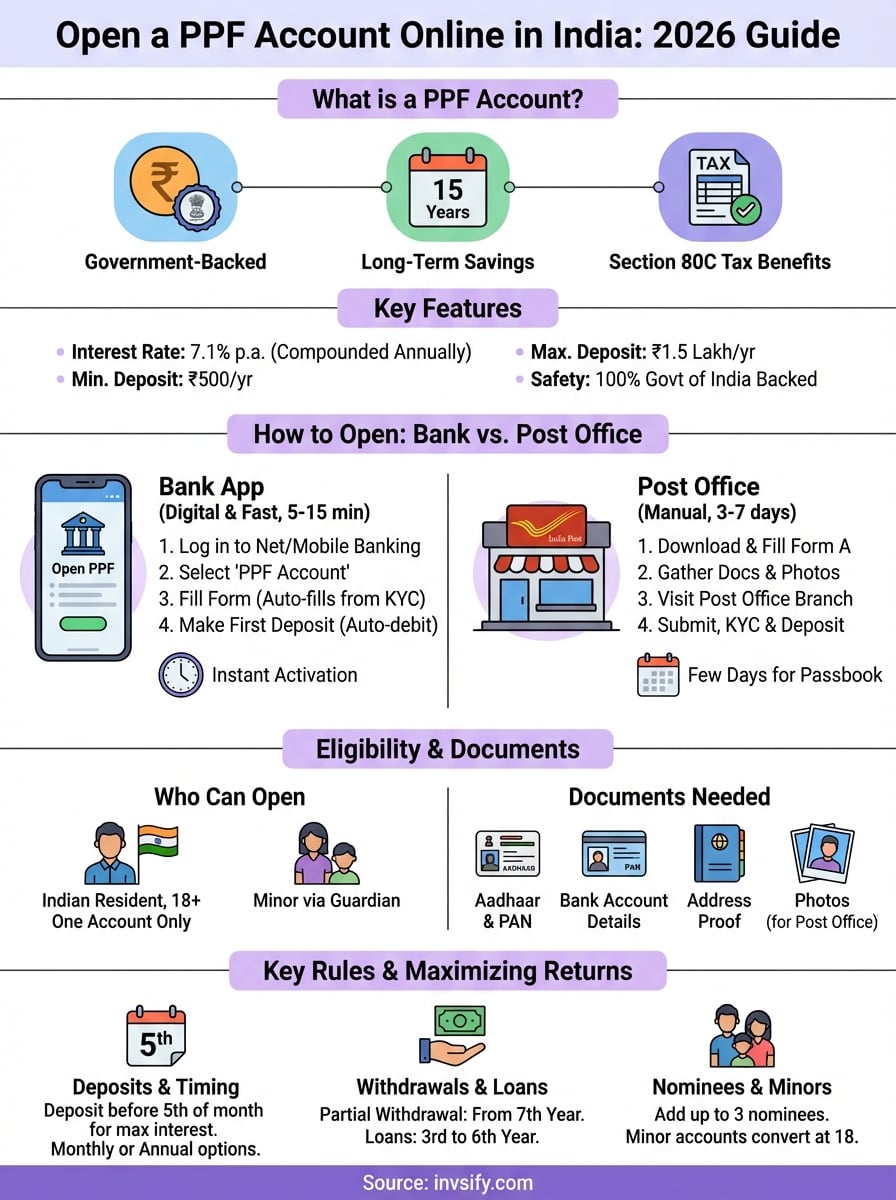
You now have everything you need to open a ppf account online and start building tax-free wealth through this government-backed scheme. The process takes less than 15 minutes through your bank app or a few days through the post office, and your account begins earning 7.1% annual interest the moment your first deposit clears. Your 15-year journey starts with a single ₹500 deposit and grows through consistent contributions timed before the 5th of each month.
The real power comes from combining your PPF strategy with other smart investment decisions that balance safety and growth. While PPF handles your guaranteed returns, you need a broader wealth plan that addresses equity exposure, emergency funds, and retirement goals beyond PPF alone.
Get personalized investment advice from SEBI-registered experts at Invsify to build a complete wealth plan that fits your goals. Their AI-powered platform shows you exactly where PPF fits alongside other tax-saving investments and helps you maximize returns while minimizing risk across your entire portfolio.